ContactGlove2 Product Specifications
Product Specifications
| Item | Specification |
|---|---|
| Battery Capacity | 1,400mAh |
| Continuous Operating Time | Approx. 8.5 hours (Internal Battery) |
| Charging Time | Approx. 3 hours (When powered OFF) |
| Charging Method | USB Type-C port |
| Hand Tracking | Acquisition of independent bending and spreading movements for each finger and joint |
| Haptic Feedback | Vibration via built-in haptic reactor |
| Wireless Communication | Proprietary communication using 2.4GHz band |
| Controller Input (via ContactGlove2)[1] | Trigger / Grip / Trackpad Press (Emulation) |
| Controller Input (via Magnetra2)[2] | A / B / System / Physical Trigger / Joystick / Trackpad Buttons (Up/Down) |
| Supported VR Headsets | Various SteamVR-compatible headsets *Operation is not guaranteed on all headsets. |
| Supported Applications | VRChat / Resonite / Other SteamVR applications [3] *Operation is not guaranteed on all SteamVR applications. |
| Tracking | Requires separate installation of trackers compatible with various tracking systems [4] |
[Details]
-
Input emulation using hand tracking data.
-
Use of A/B/System/Physical Trigger/Joystick/Trackpad Button (Up/Down) inputs requires the separate purchase of Magnetra2.
👉 *Not compatible with Magnetra1. 👉 Supports hot-swapping, allowing attachment/detachment while the main unit is powered ON.
(*Please avoid rapid, continuous plugging/unplugging as this may cause malfunction.)
- Compatibility varies by software (SteamVR use / Non-SteamVR use).
👉 Please refer to the SteamVR Specifications below for details.
- Supported Tracking Systems (Third-party)
Two trackers are required in total, one for each hand (left and right) for position and rotation tracking.
👉 Please refer to Supported Tracking Systems below for details.
SteamVR Specifications
Use in SteamVR
Skeletal Input and SteamVR Input 2.0
- SteamVR Input 2.0
- A mechanism for input functions specific to SteamVR.
- Ref: VRChat Document/SteamVR Input 2.0
- Skeletal Input
- SteamVR Input 2.0 includes a mechanism to send hand pose (skeletal information) to the application (Skeletal Input).
- Ref: ValveSoftware/openvr/wiki/SteamVR-Skeletal-Input
- What is "Skeletal Input Supported"?
- It is a SteamVR application (software).
- It uses the SteamVR Input 2.0 input mechanism.
- It references Skeletal Input data within the app.
- 👉 Skeletal Input-compliant hand tracking is available.
| Skeletal Input Supported Apps | Skeletal Input Non-Supported Apps |
|---|---|
| 👉 Allows for hand tracking with independent bending + spreading of each finger/joint compliant with Skeletal Input. | 👉 Allows for 1-axis bending hand tracking per finger compliant with Valve Index Controllers. |
| (e.g., VRChat, Resonite, The Lab) | etc |
Use in VRChat
- 👉 Please refer to the following regarding the in-game use of Skeletal Input-compliant hand tracking.
- Ref 1: VRChat Document/SteamVR Input 2.0
- Ref 2: Disabling Skeletal Input
- Ref 3: Skeletal Input for Avatar Creators
Use Outside of SteamVR
- (Please check the page for each specific software for details)
- Software supporting DivingStation Protocol
- Independent hand tracking for each finger and joint (e.g., Unity SDK)
- Motionbuilder
- Software supporting DivingStation Protocol
Supported Tracking Systems
The following systems are supported.
- SteamVR Tracking (2.0)
- (VIVE) 6DoF Inside-out Tracking
- Quest 3/3S/Pro controllers with a dedicated mount
SteamVR Tracking (2.0)
- VIVE Tracker (3.0) / Tundra Tracker
- Purchase of BaseStation 1.0/2.0 (third-party) is required separately.
- Adapters for attachment are included with ContactGlove2.
(VIVE) 6DoF Inside-out Tracking
-
VIVE Tracker (Ultimate)
- Adapters for attachment must be purchased separately.
*This adapter is used in combination with the Tundra Tracker adapter included with ContactGlove2.
- Not compatible with adapters for ContactGlove1.
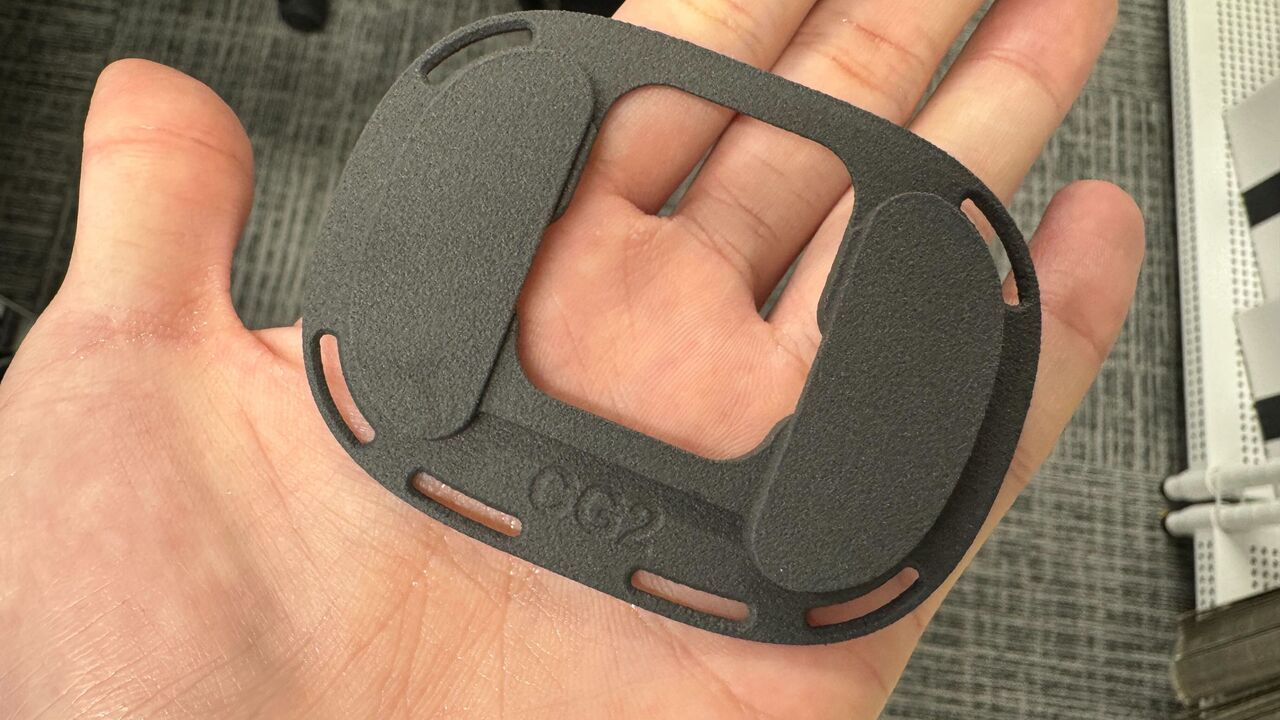
The dedicated mounter for ContactGlove2 has "CG2" engraved on the slider part (bottom).
( Universal Mounting Adaptor for Ultimate Tracker for CG2 )
There are also diagrams of each tracking environment in Usage as VR Controller. Please refer to them as well.