Documentation
ContactGloveComponent
DevicePriority
The priority of the device referenced by ContactGloveComponent. When multiple devices are connected to DivingStation, select one of up to six priorities, First through Sixth.
The SDK automatically assigns priorities to device IDs received from DivingStation, generally in their order of arrival. A device reported as the main device by DivingStation is assigned First. Device IDs cannot be selected directly to fix the assignment.
Send Vibration
Vibrates the glove.
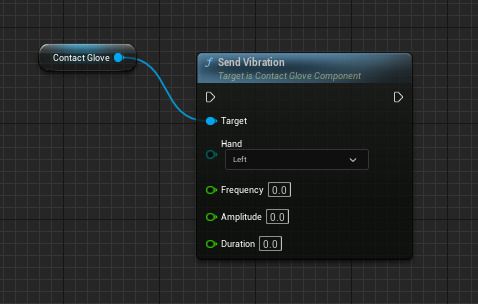
Inputs
| Name | Type | Description |
|---|---|---|
| Hand | EHandSides | Hand to vibrate |
| Frequency | float | Vibration frequency |
| Amplitude | float | Vibration strength |
| Duration | float | Vibration duration |
Set Haptics
Sets the haptic state.
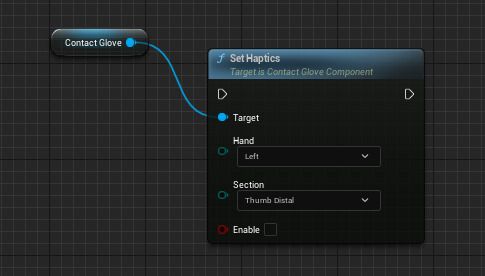
Enables or disables the internal haptic state for the finger specified by Section. The current implementation sends vibration with a default frequency, amplitude, and duration to a hand with any active haptic state.
⚠️ This function is available only on models with haptic modules sold to business customers. Standard models support vibration via
SetVibrationonly.
Inputs
| Name | Type | Description |
|---|---|---|
| Hand | EHandSides | Hand whose haptic state is set |
| Section | EColliderSection | Finger whose haptic state is set |
| Enable | bool | Whether to enable the state |
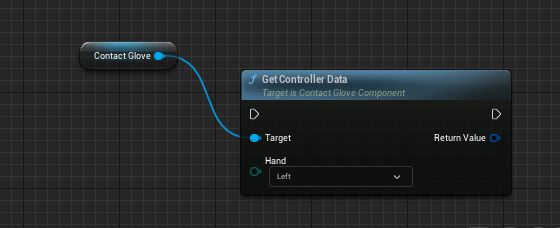
Get Controller Data
Retrieves controller information.
Inputs
| Name | Type | Description |
|---|---|---|
| Hand | EHandSides | Hand to retrieve |
Outputs
| Name | Type | Description |
|---|---|---|
| Return Value | FControllerInput | Controller information |
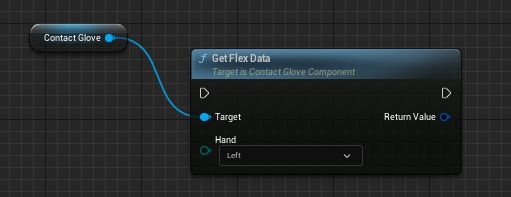
Get Flex Data
Retrieves finger flexion and abduction.
Inputs
| Name | Type | Description |
|---|---|---|
| Hand | EHandSides | Hand to retrieve |
Outputs
| Name | Type | Description |
|---|---|---|
| Return Value | FHandPose | Finger flexion and abduction |
Get Wrist Pose
Retrieves wrist pose information.
Inputs
| Name | Type | Description |
|---|---|---|
| Hand | EHandSides | Hand to retrieve |
Outputs
| Name | Type | Description |
|---|---|---|
| Return Value | FWristPose | Wrist pose |
Get Device Info
Retrieves device information.
Outputs
| Name | Type | Description |
|---|---|---|
| Return Value | FDeviceInfo | Device information |
Set Device Priority
Sets the device priority used by ContactGloveComponent.
Inputs
| Name | Type | Description |
|---|---|---|
| NewDevicePriority | EDevicePriority | New device priority |
Get Device Priority
Retrieves the device priority currently used by ContactGloveComponent.
Outputs
| Name | Type | Description |
|---|---|---|
| Return Value | EDevicePriority | Current device priority |
On Controller Data
Called when controller information is updated.
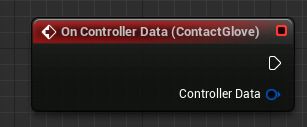
Outputs
| Name | Type | Description |
|---|---|---|
| ControllerData | FControllerInput | Controller information |
On Left Controller Received
Called when left-hand controller information is updated.
Outputs
| Name | Type | Description |
|---|---|---|
| ControllerData | FControllerInput | Left-hand controller information |
On Right Controller Received
Called when right-hand controller information is updated.
Outputs
| Name | Type | Description |
|---|---|---|
| ControllerData | FControllerInput | Right-hand controller information |
On Left Flex Data
Called when left-hand finger flexion and abduction are updated.
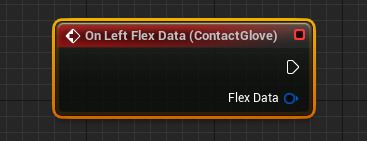
Outputs
| Name | Type | Description |
|---|---|---|
| FlexData | FHandPose | Flexion and abduction |
On Right Flex Data
Called when right-hand finger flexion and abduction are updated.
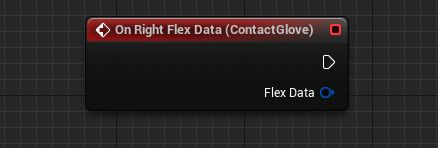
Outputs
| Name | Type | Description |
|---|---|---|
| FlexData | FHandPose | Flexion and abduction |
On Left Wrist Received
Called when the left wrist pose is updated.
Outputs
| Name | Type | Description |
|---|---|---|
| WristPose | FWristPose | Left wrist pose |
On Right Wrist Received
Called when the right wrist pose is updated.
Outputs
| Name | Type | Description |
|---|---|---|
| WristPose | FWristPose | Right wrist pose |
On Device Data Received
Called when device information is received from DivingStation.
Outputs
| Name | Type | Description |
|---|---|---|
| DeviceInfo | FDeviceInfo | Device information |
On Controller Button Pressed
Called when a controller button is pressed.
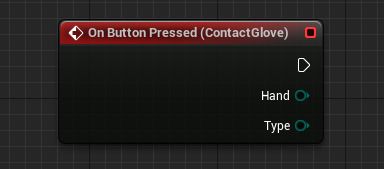
Outputs
| Name | Type | Description |
|---|---|---|
| Hand | EHandSides | Left or right hand |
| Button | EControllerBoolInputType | Button pressed |
On Controller Button Released
Called when a controller button is released.
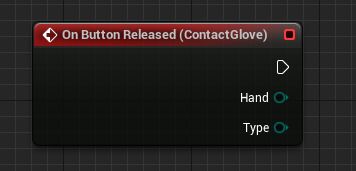
Outputs
| Name | Type | Description |
|---|---|---|
| Hand | EHandSides | Left or right hand |
| Button | EControllerBoolInputType | Button released |
ContactGloveHapticsHandler
ContactGloveHapticsHandler is an Actor that detects collisions using Sphere Colliders following the hand bones and updates the haptic state for each EColliderSection in collision, in the same way as Set Haptics.
Enable or disable it using HapticsHandler > Enabled in Details or the Blueprint node Set Haptics Handler Enabled. Disabling it turns off all haptic states for the hand controlled by that handler.
EHandSides
Enumeration for the left or right hand.
| Name | Type | Description |
|---|---|---|
| Left | EHandSides | Left hand |
| Right | EHandSides | Right hand |
EDevicePriority
Priority assigned by the SDK to device IDs received from DivingStation. Used by ContactGloveComponent.DevicePriority, Set Device Priority, and Get Device Priority.
| Name | Type | Description |
|---|---|---|
| First | EDevicePriority | First device; a device reported as main by DivingStation is assigned here |
| Second | EDevicePriority | Second device |
| Third | EDevicePriority | Third device |
| Fourth | EDevicePriority | Fourth device |
| Fifth | EDevicePriority | Fifth device |
| Sixth | EDevicePriority | Sixth device |
EColliderSection
Enumeration of fingertip sections used by Set Haptics and ContactGloveHapticsHandler. Per-finger haptic modules are available only on models equipped with them.
| Name | Type | Description |
|---|---|---|
| ThumbDistal | EColliderSection | Thumb first joint |
| IndexDistal | EColliderSection | Index finger first joint |
| MiddleDistal | EColliderSection | Middle finger first joint |
| RingDistal | EColliderSection | Ring finger first joint |
EControllerBoolInputType
Enumeration of controller buttons.
| Name | Type | Description |
|---|---|---|
| A | EControllerBoolInputType | A button |
| B | EControllerBoolInputType | B button |
| Home | EControllerBoolInputType | Home button |
| JoystickButton | EControllerBoolInputType | Joystick |
| TrackpadTouch | EControllerBoolInputType | Trackpad |
EButtonState
Enumeration of controller input states.
| Name | Type | Description |
|---|---|---|
| Idle | EButtonState | No input |
| Touched | EButtonState | Touched |
| Pressed | EButtonState | Pressed |
FControllerInput
Structure containing controller information.
| Name | Type | Description |
|---|---|---|
| bIsValid | bool | Whether the data is valid |
| Hand | EHandSides | Controller hand |
| A | bool | Whether A is pressed |
| B | bool | Whether B is pressed |
| Home | bool | Whether Home / System is active |
| System | bool | Whether System is active; currently the same as Home |
| TriggerButton | bool | Whether the trigger button is active |
| JoystickButton | bool | Whether the joystick is pressed |
| TrackpadTouch | bool | Whether the trackpad is touched |
| TrackpadButton | bool | Whether the trackpad button is active; currently the same as TrackpadTouch |
| AState | EButtonState | A button state; Idle when inactive |
| BState | EButtonState | B button state; Idle when inactive |
| SystemState | EButtonState | System / Home button state; Idle when inactive |
| TriggerButtonState | EButtonState | Trigger button state; Idle when inactive |
| JoystickButtonState | EButtonState | Joystick button state; Idle when inactive |
| TrackpadButtonState | EButtonState | Trackpad button state; Idle when inactive |
| Trigger | float | Trigger value, 0.0–1.0; 0.0 when inactive |
| GripValue | float | Grip value, 0.0–1.0; 0.0 when inactive |
| GripForce | float | Grip force, 0.0–1.0; 0.0 when inactive |
| JoystickX | float | Joystick X-axis value, -1.0–1.0; 0.0 when inactive |
| JoystickY | float | Joystick Y-axis value, -1.0–1.0; 0.0 when inactive |
| TrackpadX | float | Trackpad X-axis value, -1.0–1.0; 0.0 when inactive |
| TrackpadY | float | Trackpad Y-axis value, -1.0–1.0; 0.0 when inactive |
FControllerInput retains float values received from DivingStation as-is. The SDK does not clamp them.
FWristPose
Structure containing wrist pose information.
| Name | Type | Description |
|---|---|---|
| Hand | EHandSides | Hand |
| Rotation | FQuat | Wrist rotation |
FDeviceInfo
Structure containing device information.
| Name | Type | Description |
|---|---|---|
| DeviceID | FString | Device ID |
| IsMainDevice | bool | Whether DivingStation treats it as the main device |
| DeviceType | EDeviceType | Device type |
| DeviceName | FString | Device name |
| DeviceColor | EDeviceColor | Device LED color |
| Ping | float | Communication latency with the dongle |
| IsLeftConnected | bool | Whether the left-hand device is connected |
| LeftBattery | int | Left-hand device battery level |
| LeftPing | float | Communication latency with the left-hand device |
| IsRightConnected | bool | Whether the right-hand device is connected |
| RightBattery | int | Right-hand device battery level |
| RightPing | float | Communication latency with the right-hand device |
FHandPose
Structure containing finger flexion and abduction. Flexion is normalized from 0.0 to 1.0. Abduction is the tilt received via DSP /DS/HC/Hand, an angle with the default position at 0 degrees. The SDK retains the value from DivingStation without clamping, normalization, or conversion to degrees.
| Name | Type | Description |
|---|---|---|
| Hand | EHandSides | Hand |
| Thumb | FThumbPose | Thumb flexion and abduction |
| Index | FFingerPose | Index finger flexion and abduction |
| Middle | FFingerPose | Middle finger flexion and abduction |
| Ring | FFingerPose | Ring finger flexion and abduction |
| Little | FFingerPose | Little finger flexion and abduction |
FFingerPose
Structure containing flexion and abduction for fingers other than the thumb.
| Name | Type | Description |
|---|---|---|
| Mcp | float | MP joint flexion, 0.0–1.0 |
| Pip | float | PIP joint flexion, 0.0–1.0 |
| Dip | float | DIP joint flexion, 0.0–1.0 |
| McpAbduction | float | MP joint abduction angle, with the default position at 0 degrees |
FThumbPose
Structure containing thumb flexion and abduction.
| Name | Type | Description |
|---|---|---|
| Cmc | float | CM joint flexion, 0.0–1.0 |
| Mcp | float | MP joint flexion, 0.0–1.0 |
| Ip | float | IP joint flexion, 0.0–1.0 |
| CmcAbduction | float | CM joint abduction angle, with the default position at 0 degrees |